

Custom Laser Printable Wristbands: The Complete Guide to Effortless Event Access
2026-07-09
Ever watched guests breeze past long check-in lines at an event and wondered how it’s done? The secret often lies in custom laser printable wristbands—a simple yet powerful upgrade that turns chaotic entry processes into seamless experiences. With BAOBI, you’re not just printing wristbands; you’re unlocking a smarter way to manage access, impress attendees, and keep everything on brand. Whether it’s a music festival, corporate conference, or VIP party, the right wristband does more than identify—it sets the tone. Let’s dive into how these wearables work and why they’re becoming the go-to choice for event pros who refuse to compromise on speed or style.
Why Event Planners Are Switching to Custom Printable Wristbands
Planners are discovering that the old one-size-fits-all approach to event wristbands just doesn‘t cut it anymore. Custom printable wristbands offer a level of flexibility that stock options can’t match—you can add logos, change colors on the fly, or print unique codes right from your office printer. This means last-minute changes, like a guest list update or a security upgrade, become painless instead of a scramble. The hands-on control also lets teams match wristbands to shifting event themes without waiting on a third-party vendor, keeping the creative vision intact from start to finish.
Beyond aesthetics, there’s a practical shift driving the trend: data capture and crowd management. With printable wristbands, you can embed QR codes, sequential numbering, or scannable barcodes directly into the design, turning each band into a tiny data point. Staff can track entry counts, monitor session capacity, or verify VIP access with a quick scan, cutting down on bottlenecks. After the event, that same data helps planners understand attendee flow and preferences in a tangible way—no complex apps required, just smart, low-tech integration that works even when Wi-Fi gets spotty.
Cost and waste are also playing a big role. Ordering massive batches of pre-printed wristbands often means boxes of leftovers if attendance dips, and rush fees can cripple a budget. Custom printable options let teams print exactly what they need, when they need it, cutting down on surplus. Many are also choosing tear-resistant, recyclable materials that align with sustainability goals—attendees notice, and clients appreciate the leaner, greener approach. It’s a move toward smarter inventory that doesn’t sacrifice a polished look or operational speed.
Getting the Design Right: Tips for High-Visibility, Scan-Ready Wristbands
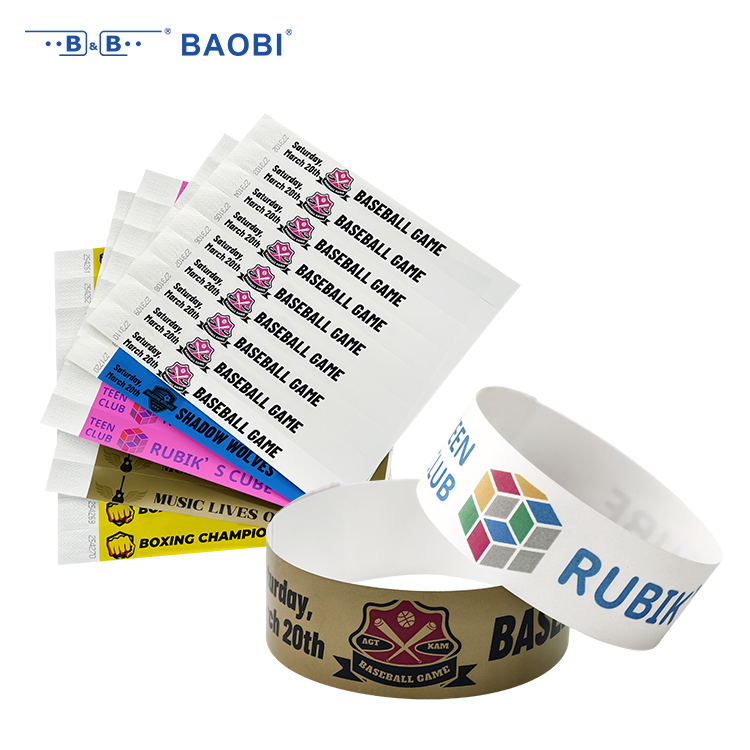
When crafting wristbands that truly catch the eye and scan cleanly, color contrast often gets sidelined but it’s a quiet powerhouse. Light text on a dark background might feel counterintuitive for printing, yet it creates a sharp silhouette for barcode scanners and tired human eyes alike—just make sure the contrast ratio stays above 4.5:1 for critical details like QR codes and ticket numbers. A trick is to print a faint high-contrast border around scannable zones; it’s barely noticeable to people but helps the scanner’s red beam find its target instantly, reducing those awkward fumbling moments at entry gates.
Material texture plays a bigger role than most designers admit. Smooth, high-density synthetic substrates don’t just feel premium—their low surface friction lets scanner lenses behave consistently across wristbands, whether they’re flattened on a desk or wrapped around a moving wrist. If you’re working with event-scale production, ask for sample swatches and test them under the exact lighting your venues will use. Avoid pearlescent finishes near the scannable area; that subtle shimmer can scatter light and turn a clean code into a blur. Instead, dedicate a small strip of matte clear laminate over the scan region, a trick borrowed from outdoor equipment tagging that massively boosts reliability without changing the overall look.
Keep the wearable reality in mind from the start, not as an afterthought. A wristband that looks perfect flat on screen might fold or curve in ways that distort variable data when it’s worn, especially if multiple adhesive layers are involved. Work with your printer to understand the exact snap and adhesion angle on the wrist; then position QR codes and text parallel to the band’s length, not across it, so the natural arc doesn’t warp the reading zone. A subtle design cue—like a faint dashed line indicating the scan area—can guide festival staff or venue workers to scan in the right spot without needing training, turning a potential bottleneck into a seamless flow.
Material Matters: Choosing Between Tyvek, Vinyl, and Polyester
When it comes to selecting the right substrate for demanding applications, the subtle differences between Tyvek, vinyl, and polyester often tip the scales. Tyvek, with its high-density polyethylene fibers, offers a unique combination of lightweight durability and breathability—ideal for medical packaging or construction wraps where moisture vapor transmission matters. Unlike traditional papers, it resists tearing and water while remaining surprisingly supple, making it a go-to for situations that demand both strength and sterility without the bulk.
Vinyl, on the other hand, leans heavily into versatility and weather resistance. Its plasticized surface shrugs off rain, UV rays, and temperature swings, which explains why you’ll find it dominating outdoor banners, marine upholstery, and long-term signage. However, that toughness comes with a weight penalty and environmental considerations, as vinyl isn’t always the easiest to recycle. Still, for projects where longevity under direct sun matters more than eco-credentials, it remains a pragmatic choice.
Then there’s polyester—engineered for precision and endurance. Woven polyester fabrics excel in high-tension applications like flags, sails, or industrial belting, offering minimal stretch and exceptional tear resistance. Its smooth surface also makes it a favorite for dye-sublimation printing, where vibrant, long-lasting color is non-negotiable. When you stack these three materials side by side, the decision really hinges on what you value most: Tyvek’s breathable protection, vinyl’s all-weather brawn, or polyester’s dimensional stability under stress.
Laser Printing Demystified: How to Achieve Crisp Barcodes Every Time
Getting laser-printed barcodes to scan reliably often comes down to a few overlooked details. Start with the print resolution—aim for at least 300 dpi, though 600 dpi is even better for tight symbols. If your printer has a “toner save” mode, turn it off; skimping on toner leads to faded bars that scanners can’t read. Also, check that the media type setting matches what’s actually loaded—heavy paper or labels need the correct heat and speed to fuse toner properly. A quick test print on the exact stock you’ll use can save hours of frustration later.
Many people overlook the role of image transfer. Instead of copying a barcode from a website and pasting it into a document, use a dedicated barcode generator that outputs vector formats like EPS or PDF. Raster images scaled up or down introduce fuzzy edges, which confuse the scanner. When you must use a bitmap, keep the resolution at 1:1 relative to the printer’s output and avoid any compression. For consistent results, print a calibration page and adjust the darkness setting until you get solid, uniform bars without toner scatter.
Finally, don’t forget the quiet zones—the blank margins on either side of the barcode. Crowding them with text or borders is a frequent mistake that makes even a well-printed symbol unscannable. Give the barcode at least ten times the narrow bar width of clear space, and consider printing orientation; for laser printers, aligning the bars perpendicular to the paper feed direction often yields straighter edges. Keep your printer’s fuser and drum in good shape, and wipe down the paper path periodically to prevent random specks from interfering with the code.
Streamlining Check-In: Wristband Integration With Event Apps
The days of fumbling with paper tickets and waiting in serpentine queues are fading fast. By syncing wristband technology directly with your event app, the entry process becomes a fluid, almost invisible experience. Attendees simply activate their wristbands through the app beforehand, and a quick tap at the gate confirms their identity and access level. This not only dramatically cuts down wait times but also eliminates the frantic search for a printout or a buried email on a phone screen.
Beyond mere entry, the real magic happens when wristbands and apps start communicating in real time. Imagine a guest walking into a VIP lounge—the wristband triggers a personalized welcome message on nearby screens, and the app instantly reveals a curated list of available sessions and perks tailored to that attendee’s badge type. It transforms the wristband from a static credential into a dynamic key that unlocks layers of the event, adapting on the fly based on movement and engagement.
For organizers, this integration paints a clearer picture of event flow without invasive tracking. You can see which areas draw the most footfall, how long people linger at certain exhibits, and where bottlenecks form, all while respecting privacy through anonymized data streams. This allows for on-the-spot adjustments—like opening an additional entry lane or sending app notifications about a quieter networking zone—keeping the experience seamless for everyone involved.
Real-World Wins: Festivals That Nailed Contactless Entry
Take Coachella’s 2022 comeback, for instance. Instead of the usual wristband chaos, they rolled out a fully integrated NFC system that synced tickets, payments, and even locker codes to a single wearable. Festival-goers just tapped their way through gates and merch lines without ever fumbling for a phone or wallet. The result? Peak entry times dropped from 90 minutes to under 20, and social chatter lit up with praise for how smooth everything felt.
Across the Atlantic, Glastonbury quietly pulled off a similar feat by letting attendees pre-register biometric data on a secure app months in advance. On arrival, facial recognition kiosks matched faces in under two seconds, even in drizzle and mud. Staff said it slashed manual ID checks — and the exhaustion that came with them — while still keeping gatecrashers out. Regulars noticed the difference immediately: fewer queues, more time to soak in the first act of the day.
Then there’s Tomorrowland, which turned entry into part of the experience itself. They embedded RFID chips into whimsical bracelets that unlocked not just the main gate but also hidden stages and surprise performances. By scattering “secret” touchpoints around the grounds, they made scanning feel like a treasure hunt rather than a security hurdle. It was a masterclass in how contactless tech can amplify festival identity instead of just solving a logistical headache.
FAQ
They’re wristbands you can personalize with a standard laser printer, then apply using a simple peel-and-stick closure. No special equipment needed, just print your design, wrap around the wrist, and secure—perfect for instant, professional-looking event access control.
Laser printable wristbands combine the durability of synthetic material with on-the-spot customization. Unlike pre-printed wristbands, you have full creative control to add variable data like barcodes, names, or seat numbers. They’re also more tear-resistant and water-resistant than Tyvek, making them last through multi-day events.
You can print anything from elegant logos to intricate security patterns and QR codes. Because they’re printable in full color, you’re only limited by your design software and printer capabilities. Just avoid coating the areas where the adhesive and closure will be—everything else is fair game.
Extremely durable. Made from thick synthetic material, they resist water, sweat, and minor scuffs. They won’t tear easily and stay legible even after days of wear. Perfect for pool parties, festivals, or multi-day conferences where guests need to keep them on throughout.
Any event needing quick, reliable access control: music festivals, VIP parties, corporate conferences, water parks, school field trips, charity runs, and even hospital patient identification. They’re versatile enough to adapt to crowd management, tiered access, or temporary staff credentials.
Yes—peel the backing only partially, align the band around the wrist (not too tight), then press the adhesive side onto the band while smoothing out air bubbles. The closure uses a tamper-evident adhesive, so once it’s stuck, it won’t slide off. For extra comfort, a snug but not constricting fit is key.
They come in standard sheet sizes (like 8.5x11") that feed through any regular laser printer. Sheets are micro-perforated, so you just pop out the bands after printing. No cutting or special tools required—just your printer, your design, and you’re ready to go.
Use high-contrast designs and avoid overly intricate backgrounds behind the code. Test-print on plain paper first to confirm the size. The wristband surface is smooth and matte, so standard large-format barcodes scan without issues. For curved surfaces, keep the code away from the band’s edges where crumpling might occur.
Conclusion
Custom laser printable wristbands have reshaped event entry, turning what was once a logistical headache into a smooth, contact-free experience. Organizers are moving away from traditional tickets and plastic badges because printable wristbands can be produced on demand with attendee details and scannable codes, cutting down waste and long registration lines. A clear, high-contrast design becomes essential here: generous white space around barcodes, bold sans-serif fonts, and dark ink on light substrates prevent scanning failures at busy gates. Material choice plays a huge role in durability and comfort—Tyvek works for single-day affairs with its water-resistant feel, while soft vinyl or woven polyester suits multi-day festivals where wristbands need to survive showers, sunscreen, and dance floors without fraying or fading. Laser printing itself isn’t magic; it demands clean optics, proper heat settings matched to the wristband stock, and regular test scans to keep barcodes crisp from first print to last.
Integration with event apps ties everything together: a quick laser-printed QR or barcode links directly to ticketing databases, letting staff use handheld scanners or smartphones for split-second validation, which syncs attendance data in real time and flags duplicate check-ins automatically. Real-world successes prove the model—large-scale music festivals have replaced paper tickets entirely, using pre-printed wristbands mailed to attendees or on-site kiosks that print and encode in seconds, eliminating box-office queues and reducing no-shows. The same approach has streamlined VIP areas, cashless payments, and session tracking at conferences, all while giving organizers live dashboards of crowd flow. By focusing on practical design, choosing the right material for the environment, mastering the print process, and seamlessly linking to mobile apps, event teams deliver a seamless, professional entry that guests hardly notice—and that’s the real win.
Contact Us
Contact Person: Bill Xu
Email: [email protected]
Tel/WhatsApp: 8618688898707
Website: https://www.baobitech.com/